- High Performance Editor
- Instant response. A focused editor that stays out of your way—so words can keep up with your thoughts.
A workspace built for writers
A focused workspace for storytellers
Where novels, screenplays, and drafts find room to grow—stories take shape with smart tools, sync, and a calm workspace.
Chapter 1 — Departure
The harbor was quiet at this hour. Lanterns guttered against the sea-wind and the sound of the tide rolled like distant applause, and somewhere beyond the breakwater a bell tolled twice. Claire counted them the way a child counts heartbeats — in the dark, in private, as if the sound itself could be hoarded.
She had not slept. She would not sleep. Sleep was for people who believed the morning would still belong to them.
The dock, before dawn
Three boats lay at anchor, their masts black against a paler black. Beyond them: the breakwater, the open mouth of the harbor, the country she had agreed to leave behind. The wind carried the smell of tar and salt and the cold green note of weed. She had been told, once, that you could read the weather by the sound of rope against wood. She had not believed it. She believed it now.
She kept to the leeward rail the whole crossing, and not once in eight days did she look down at the water.
What she carried
- A letter, unread, sealed in wax the color of dried blood — Marcus had pressed it into her hand without speaking.
- A pocket watch that no longer kept time.
Useless.Kept anyway. - A spare pair of gloves; the wool was already stiff with salt.
- The address of a house in a city she had never seen.
What she left
- The garden, half-dug.
- A debt she did not intend to repay.
- Her mother's name, in her own handwriting, on the door.
"You'll come back," she said. "Everyone does, in the end."
Claire did not answer. There was no answer that would not be a lie.
A glance toward the dock
Then — a lantern, swung once, twice, the signal she had been waiting for. She pulled her coat tighter and walked toward the water, and the wind, which had been only weather a moment before, became a voice.
Read more in Chapter 2 — The Crossing. See also the outline for act one.
Revision checklist
Cut the second lantern beat — it repeats the opening page.
Name the ship before the breakwater scene.
Plant the pocket watch earlier, in Marcus's hands.
Decide whether chapter 9 keeps the breakwater motif.
Your story isn't linear.
Your tools shouldn't be either.
- Plotboard
- Map beats, arcs, and turning points with cards that stay connected to the work. Rearrange in seconds, and keep the whole structure in view.
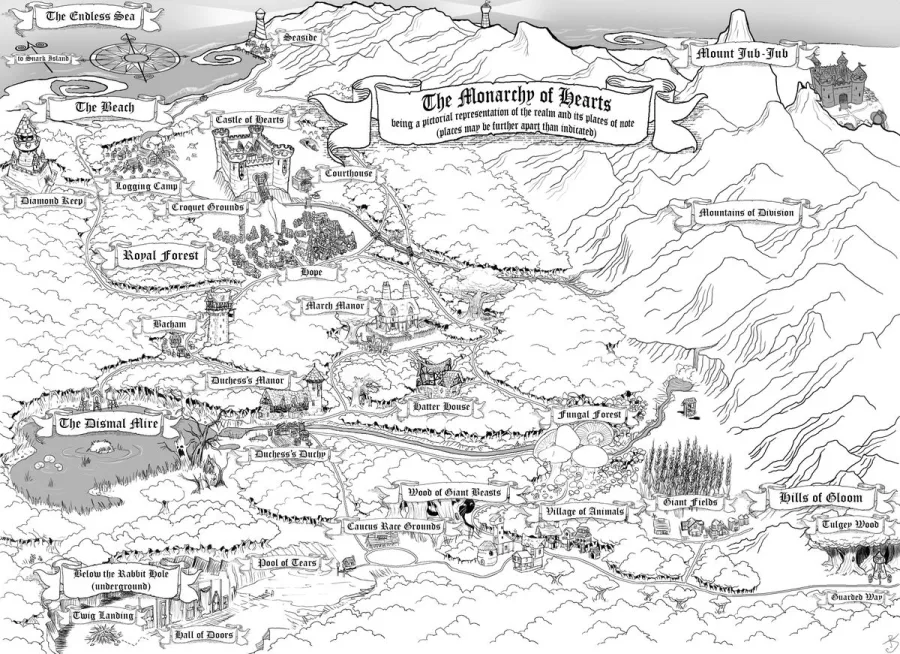
The opening act in which Alice leaves ordinary reality and enters a strange new world.
Alice follows a White Rabbit carrying a watch and leaps into a deep hole. As she falls, the order of things collapses, and the world of logic is overturned.
As Alice ventures deeper into Wonderland, she encounters a series of strange creatures and bizarre meetings.
Tears shed during experiments with changing size become a vast pool that engulfs Alice. The boundary between self and others begins to blur.
As the plot accelerates toward its climax, a world where power and confusion are intertwined comes into view.
A caterpillar sitting on a mushroom asks, 'Who are you?' By revealing the secret of changing size, Alice makes her first attempt to define herself.
- Canvas
- Spread ideas out. Pull them together. Arrange blocks freely to explore relationships and shape scenes visually.
- Links
- Context, everywhere. See what's connected, jump between related pieces, and keep continuity intact as your world grows.
Connect related notes with backlinks. This note references Alice in Wonderland so you can jump between ideas instantly.
- @Alice
- Alice in Wonderland
- Alice — characters
- Alice — act outline
- Alice — visual notes
- Alice — reference clips
- Graph View
- A clear view of complexity. Explore characters, locations, and threads as an interactive network.
- Task Management
- Turn intent into progress. Create tasks where the work lives, add dates, and keep momentum across every draft.
Tasks
One project, on every screen.
For the chapter you start at the desk and carry on with on the train. Same files, same editor, same boards, opened the way you left them.
Chapter 1 — Departure
The harbor was quiet at this hour. Lanterns guttered against the sea-wind and the sound of the tide rolled like distant applause, and somewhere beyond the breakwater a bell tolled twice. Claire counted them the way a child counts heartbeats — in the dark, in private, as if the sound itself could be hoarded.
She had not slept. She would not sleep. Sleep was for people who believed the morning would still belong to them.
The dock, before dawn
Three boats lay at anchor, their masts black against a paler black. Beyond them: the breakwater, the open mouth of the harbor, the country she had agreed to leave behind. The wind carried the smell of tar and salt and the cold green note of weed. She had been told, once, that you could read the weather by the sound of rope against wood. She had not believed it. She believed it now.
She kept to the leeward rail the whole crossing, and not once in eight days did she look down at the water.
What she carried
- A letter, unread, sealed in wax the color of dried blood — Marcus had pressed it into her hand without speaking.
- A pocket watch that no longer kept time.
Useless.Kept anyway. - A spare pair of gloves; the wool was already stiff with salt.
- The address of a house in a city she had never seen.
What she left
- The garden, half-dug.
- A debt she did not intend to repay.
- Her mother's name, in her own handwriting, on the door.
"You'll come back," she said. "Everyone does, in the end."
Claire did not answer. There was no answer that would not be a lie.
A glance toward the dock
Then — a lantern, swung once, twice, the signal she had been waiting for. She pulled her coat tighter and walked toward the water, and the wind, which had been only weather a moment before, became a voice.
Read more in Chapter 2 — The Crossing. See also the outline for act one.
Revision checklist
Cut the second lantern beat — it repeats the opening page.
Name the ship before the breakwater scene.
Plant the pocket watch earlier, in Marcus's hands.
Decide whether chapter 9 keeps the breakwater motif.
The harbor was quiet at this hour. Lanterns guttered against the sea-wind and the sound of the tide rolled like distant applause, and somewhere beyond the breakwater a bell tolled twice. Claire counted them the way a child counts heartbeats — in the dark, in private, as if the sound itself could be hoarded.
She had not slept. She would not sleep. Sleep was for people who believed the morning would still belong to them.
The dock, before dawn
Three boats lay at anchor, their masts black against a paler black. Beyond them: the breakwater, the open mouth of the harbor, the country she had agreed to leave behind. The wind carried the smell of tar and salt and the cold green note of weed. She had been told, once, that you could read the weather by the sound of rope against wood. She had not believed it. She believed it now.
She kept to the leeward rail the whole crossing, and not once in eight days did she look down at the water.
What she carried
- A letter, unread, sealed in wax the color of dried blood — Marcus had pressed it into her hand without speaking.
- A pocket watch that no longer kept time.
Useless.Kept anyway. - A spare pair of gloves; the wool was already stiff with salt.
- The address of a house in a city she had never seen.
What she left
- The garden, half-dug.
- A debt she did not intend to repay.
- Her mother's name, in her own handwriting, on the door.
"You'll come back," she said. "Everyone does, in the end."
Claire did not answer. There was no answer that would not be a lie.
A glance toward the dock
Then — a lantern, swung once, twice, the signal she had been waiting for. She pulled her coat tighter and walked toward the water, and the wind, which had been only weather a moment before, became a voice.
Read more in Chapter 2 — The Crossing. See also the outline for act one.
Revision checklist
Cut the second lantern beat — it repeats the opening page.
Name the ship before the breakwater scene.
Plant the pocket watch earlier, in Marcus's hands.
Decide whether chapter 9 keeps the breakwater motif.
- Version history
- Easily track changes between revisions, with version history kept for every file.
The river at dawn
She could smell the mud before she saw it—last night's rain still trapped in the reeds. Somewhere upstream a bird tried once, then quit.
Fog over the water thinned at the banks.
Mist hung low until the sun tore a ragged hole in it above the east bend.
Beat 3: does Min's anger land, or read petulant?
Tie in the ferryman's line from ch. 2 — double-check wording
Research: tidal charts for this stretch (April)
- Export
- Microsoft Word, PDF, EPUB, Markdown, Hangul (HWP), plain text, and more—send your work out in the format you need.
- AI review
- Suggestions and review panels sit beside your draft so feedback never loses context.
Well done! Top 15%
Chapter 3: A Caucus Race and a Long Tale
1. Overall feedback
This chapter is a masterclass in whimsical storytelling, effectively using a simple problem—how to get dry—to introduce the absurd logic of its world. The story structure cleverly contrasts a logical but ineffective solution with a chaotic but successful one, creating a memorable and humorous narrative. The characters, from the pompous Dodo to the easily-offended Mouse, are brought to life through sharp, distinctive dialogue that reveals their personalities in just a few lines. While the pacing of the Mouse's long, dry history lesson is intentionally slow, it serves as an excellent setup for the vibrant energy of the Caucus-race that follows. The narrative style is particularly engaging, with a narrator who speaks directly to the reader, pulling them deeper into the story's unique charm. The chapter generates a consistent feeling of amused bewilderment, stemming from the clash between Alice's pragmatism and the animals' nonsensical behavior. This distinctiveness is a strong asset for marketability, as the episode's central event is both bizarre and unforgettable. Finally, the worldbuilding is executed brilliantly, establishing the world's unconventional rules not through exposition, but through the absurd outcome of the race itself.
2. Strengths
Story: A Clear Goal with an Illogical Resolution
The chapter's story is built around a simple, relatable goal: a group of soaked characters needs to get dry. The way this goal is achieved is a perfect showcase of the story's core identity. The narrative sets up a logical expectation with the Mouse's "dry" history lesson, only to subvert it by having that method fail completely. The solution that works—the chaotic and rule-free Caucus-race—reinforces the central theme that this world operates on a different, more whimsical logic. This structure provides a satisfying, if nonsensical, arc for the episode.
"As wet as ever," said Alice in a melancholy tone: "it doesn't seem to dry me at all." … However, when they had been running half an hour or so, and were quite dry again, the Dodo suddenly called out, "The race is over!"
Character: Personality Revealed Through Dialogue
Each character feels distinct and memorable, even with minimal "screen time." Their personalities are efficiently conveyed through their unique ways of speaking and reacting. The Dodo's use of overly formal, verbose language, immediately challenged by the practical Eaglet, perfectly establishes their respective characters without any need for descriptive narration. This makes the interactions feel dynamic and humorous.
"I move that the meeting adjourn, for the immediate adoption of more energetic remedies—" "Speak English! " said the Eaglet. "I don't know the meaning of half those long words, and, what's more, I don't believe you do either!"
Style: Intimate and Conversational Narration
The narrative voice breaks the "fourth wall" to speak directly to the audience, creating a charming and intimate tone. This technique makes the reader feel like they are being told a personal story by a friendly narrator. It's particularly effective because it mirrors the feeling of a classic bedtime story, drawing the reader closer to the whimsical events and making the impossible feel more believable.
(And as you might like to try the thing yourself, some winter day, I will tell you how the Dodo managed it.)
Worldbuilding: Showing, Not Telling, the Rules of the World
The chapter excels at establishing the rules of its world through action rather than explanation. The nonsensical nature of the Caucus-race, where there's no start, no finish, and no single winner, culminates in a declaration that perfectly defines the world's logic. This moment teaches the reader a fundamental rule of this universe: conventional ideas of competition and fairness do not apply here.
At last the Dodo said, "Everybody has won, and all must have prizes."
3. Areas for improvement
Pacing: An Intentionally "Dry" Section Risks Losing Engagement
The extended passage where the Mouse recites a dry piece of English history is a clever pun and serves a narrative purpose by failing to dry the characters. However, its length and deliberately boring content create a significant slowdown in the narrative tempo. While this sets up the contrast with the energetic Caucus-race, some readers might find their attention wandering during this section, potentially disengaging from the story just before the main event.
"'William the Conqueror, whose cause was favoured by the pope, was soon submitted to by the English, who wanted leaders, and had been of late much accustomed to usurpation and conquest. Edwin and Morcar, the earls of Mercia and Northumbria—'" "Ugh!" said the Lory, with a shiver.
Condensing this historical monologue slightly could achieve the same effect—demonstrating its ineffectiveness and humor—without risking reader fatigue. The point is made very quickly that the story is boring and not working, so dwelling on the specific historical details for too long can feel like a slight drag on an otherwise briskly paced chapter.
Emotion: Alice's Role as an Observer Can Feel Passive
Throughout the chapter's key events, Alice is primarily an observer and a reactor. She listens to the Mouse, asks what a Caucus-race is, and then hands out prizes when told to. While her confusion is the lens through which the reader experiences the absurdity, her lack of agency in the solution can make her feel somewhat passive. Her primary emotional notes are melancholy and confusion, which limits the emotional range of the protagonist's experience in this part of the story.
"What is a Caucus-race?" said Alice; not that she wanted much to know, but the Dodo had paused as if it thought that somebody ought to speak, and no one else seemed inclined to say anything. … Alice had no idea what to do, and in despair she put her hand in her pocket, and pulled out a box of comfits...
Giving Alice a more active, even if failed, suggestion for how to get dry before the Dodo speaks could strengthen her presence. For example, if she proposed a logical real-world game that the animals found even more ridiculous than the Mouse's history lesson, it would reinforce her "outsider" status while giving her a more proactive role in the scene's problem-solving, adding another layer to her emotional arc of frustration.
4. Future suggestions
Lean into the Logic of Illogic
The chapter's greatest strength is its consistent internal logic, even when that logic is absurd. The Caucus-race is strange, but it follows its own rules (or lack thereof) to a satisfying conclusion. As the story progresses, continue to ensure that every bizarre event has its own form of internal consistency. The charm of this world lies in the fact that it is not just random nonsense; it's a system with nonsensical rules that are followed earnestly by its inhabitants. This creates a more immersive and rewarding experience for the reader.
"Why," said the Dodo, "the best way to explain it is to do it."
Amplify Character Voices in Conflict
The brief exchange between the Dodo and the Eaglet is a highlight because it puts two distinct character voices in direct, humorous conflict. Look for more opportunities to create these small clashes between characters. For example, when Alice is asked for prizes, the current text has a "chorus of voices." You could instead give a few of those lines to specific animals, each demanding a prize in a way that reflects their established personality. This would add more texture and humor to the scene while further developing the individual characters.
"But who is to give the prizes? " quite a chorus of voices asked. "Why, she, of course," said the Dodo, pointing to Alice with one finger...

- Plugins
- The goal, time, and progress widgets are all plugins — keep the ones that help, add more from the community, or write your own.Browse plugins
A writing assistant built for authors.
It finds the detail you set up, keeps the characters and events in order, and works out what happens next with you. The assistant carries the context; you stay on the story.
Find a detail
Search that finds the detail you scattered. It reads the character sheets, the plot cards and the chapters together, finds the sentence, and opens the file where it sits.
Build a mindmap
A canvas that holds the world on one sheet. It reads the settings you have already written, lays the people and places out as nodes, and draws the relationships between them.
Create a plotboard
A board for designing what happens next. It works from the chapters already written, stands the acts and scenes up as cards, and carries the threads between them across.
Chapter 1 — Departure
The harbor was quiet at this hour. Lanterns guttered against the sea-wind and the sound of the tide rolled like distant applause, and somewhere beyond the breakwater a bell tolled twice. Claire counted them the way a child counts heartbeats — in the dark, in private, as if the sound itself could be hoarded.
She had not slept. She would not sleep. Sleep was for people who believed the morning would still belong to them.
The dock, before dawn
Three boats lay at anchor, their masts black against a paler black. Beyond them: the breakwater, the open mouth of the harbor, the country she had agreed to leave behind. The wind carried the smell of tar and salt and the cold green note of weed. She had been told, once, that you could read the weather by the sound of rope against wood. She had not believed it. She believed it now.
She kept to the leeward rail the whole crossing, and not once in eight days did she look down at the water.
What she carried
- A letter, unread, sealed in wax the color of dried blood — Marcus had pressed it into her hand without speaking.
- A pocket watch that no longer kept time.
Useless.Kept anyway. - A spare pair of gloves; the wool was already stiff with salt.
- The address of a house in a city she had never seen.
What she left
- The garden, half-dug.
- A debt she did not intend to repay.
- Her mother's name, in her own handwriting, on the door.
"You'll come back," she said. "Everyone does, in the end."
Claire did not answer. There was no answer that would not be a lie.
A glance toward the dock
Then — a lantern, swung once, twice, the signal she had been waiting for. She pulled her coat tighter and walked toward the water, and the wind, which had been only weather a moment before, became a voice.
Read more in Chapter 2 — The Crossing. See also the outline for act one.
Revision checklist
Cut the second lantern beat — it repeats the opening page.
Name the ship before the breakwater scene.
Plant the pocket watch earlier, in Marcus's hands.
Decide whether chapter 9 keeps the breakwater motif.
Chapter 2 never says it outright. Claire keeps to the leeward rail for the whole crossing and will not look down at the water — the first hint is a stage direction, not a line.
Let me check the rest of the project for anywhere you put it more plainly.
Thought for 1 seconds
Her sheet records it as fact: she never learned, and the harbour years are why. So chapter 2 is where the manuscript first plays it, three chapters before the storm needs it.
Everything is kept safe.
You decide whether to sync at all, and how much AI ever sees. Whatever is stored is AES encrypted, and none of it is ever used to train AI.
Changelog
Five new plugins
Calculator, Date Calculator, Unit Converter, Paragraph Analysis, and Status Window are now in the community gallery. Sheets can share tags and inherit fields, and writing time counts once across every open window.
Aug 22, 2026
Plugins
pensiv takes plugins. Install one from the community, or write the thing nobody has built yet.
Aug 18, 2026
Canvas images, file previews, and Notion import
Images drop straight onto the canvas, and file nodes show the document inside them. Plus Notion import, sync you can watch, and search folded into the command palette.
Aug 2, 2026
An agent that helps you write
The writing agent is out of beta. Build mindmaps and plotboards from a prompt and search your whole project for context.
Jul 21, 2026
Frequently Asked Questions
If you have other questions, please email us and we'll respond promptly.
Try now.
Make your story come to life.