
Calculator
A calculator that lives where the writing is: docked in the side pane of every file type, and as an optional floating widget.
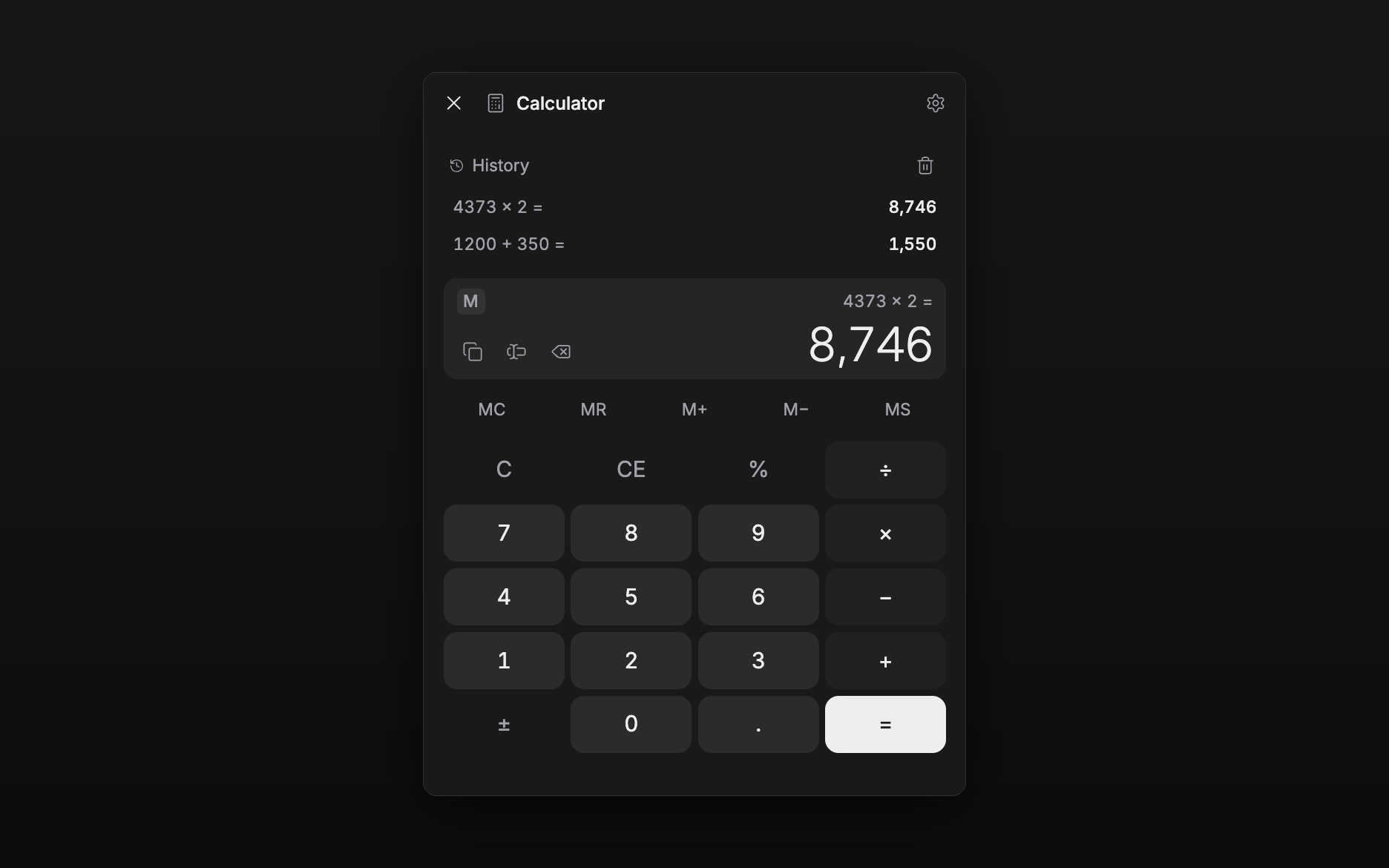
Features
- Full four-function keypad with
%, sign flip,CE/Cand backspace - Memory keys (
MCMRM+M−MS) with anMindicator on the display - A short history of finished calculations; tap one to put it back on the display
- Copy the result, or insert it straight into the open document or sheet
(result only, or
12 × 4 = 48, your choice) - Keyboard input while the panel has focus: digits,
+ - * /,Enter,Backspace,Esc - The same calculator everywhere (side pane, floating widget, and the tray chip and bottom sheet on phones), all sharing one calculation
- Command:
Calculator: Toggle floating widget
Usage
Enable the plugin and a calculator toggle appears in the header of every file: document, sheet, plotboard, canvas, folder view or task. Click it and the calculator docks in that file's side pane, beside the editor, where it stays while you write. On a phone the same view opens from the "..." sheet, and on a tablet from the header cluster.
Prefer it floating over the text? Settings → Calculator → Show floating widget, or run the toggle command. Both surfaces share one calculation, so a sum started in the pane is finished in the widget.
Number formatting (thousands separators, decimal places) and what the insert button writes are in the same settings tab.