Paragraph Analysis
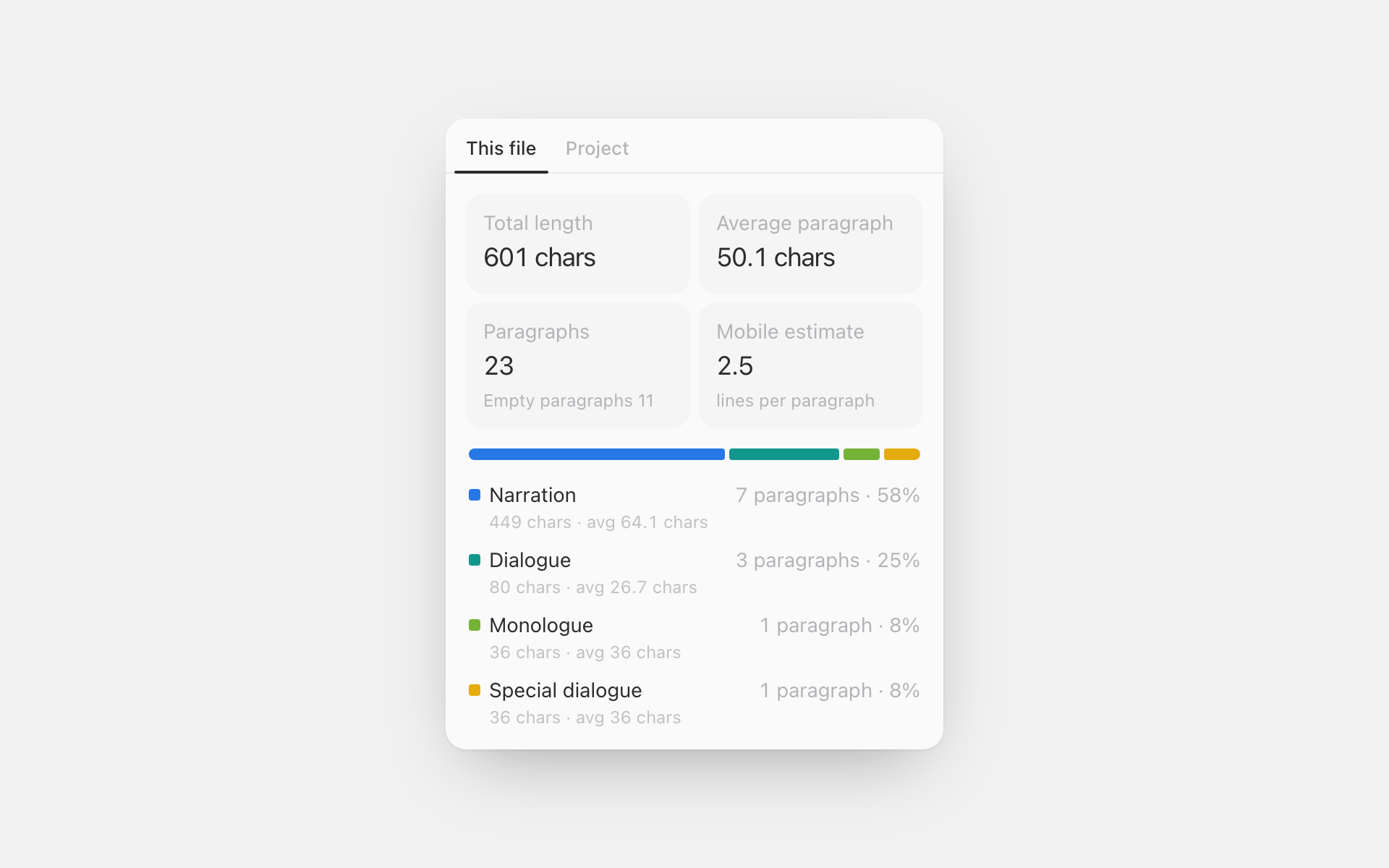
A panel that keeps counting beside your manuscript: how many paragraphs and characters go to narration, dialogue, monologue and special dialogue, how long the average paragraph runs, and how many lines one takes on a phone.
How a paragraph is classified
Only the first character matters. A double quote opens dialogue; a single quote
or a parenthesis opens monologue; brackets, white corner brackets and angle
brackets open special dialogue; everything else is narration. The rule keys off
the mark itself rather than your UI language, so a 「」 inside a Korean
manuscript and a straight quote inside an English one both read correctly.
| Bucket | Opens with |
|---|---|
| Dialogue | “ ” " " 「 」 « » |
| Monologue | ‘ ’ ' ' ( ) ( ) |
| Special dialogue | [ ] [ ] 【 】 〔 〕 〈 〉 《 》 『 』 { } |
| Narration | everything else |
| (empty) | nothing but whitespace; counted, never bucketed |
A speech tag after the line doesn't change it: "Not bad," he said. is dialogue.
A quote in the middle of a sentence doesn't create one. An opener with no closer
stays narration rather than becoming a guess, and an apostrophe is never read as
a closing quote, so 'Tis the season stays narration too. Indentation (the
full-width space included) is stripped before judging, so a manuscript pasted in
from somewhere else still reads correctly.
The defaults follow what Korean, English-language and Japanese manuscripts
actually use, and every ambiguous family is remappable in settings: some writers
put system messages in parentheses, some reserve 『 』 for titles.
A narration-heavy English manuscript is not a bug. English inner voice is carried by italics, which leaves no trace in plain text, so no rule keyed to marks can find it.
Empty paragraphs are counted separately
Blank-lining between paragraphs halves the average paragraph length. This plugin counts empty paragraphs on their own and leaves them out of the average, so the figure on screen is what you actually wrote.
The rest of the counting is tuned for manuscripts too:
- An emoji or a rare CJK ideograph counts as one character.
- A Shift+Enter line break is its own paragraph by default; writers who never press Enter would otherwise show one 4,000-character "paragraph".
- Headings are left out entirely; a chapter title is not prose.
- The mobile estimate works out each paragraph's line count separately before averaging, so a one-character paragraph never rounds down to zero lines. The line defaults to 28 characters (Korean / Japanese); English wants about 45.
Also
- Tabs for this file and the whole project
- A project-wide mix card in Settings → Analytics
- Settings for the classification rules, how characters are counted, and the mobile line length
- Copy the summary to the clipboard from the command palette
- Korean, English and Japanese
Usage
Enable the plugin, then open Paragraph Analysis from a document's header. The numbers follow your typing, and the tabs at the top switch between this file and the whole project.
More like this
Unit Converter
Length, weight, area, volume, temperature, speed and time — including the old East Asian units period fiction is written in (尺, 里, 坪, 斤, 되).
Calculator
A calculator that lives in the file header and as a floating widget — memory keys, a short history, and one tap to drop the result into your text.
Canvas Checklist
A checklist card you can drop on a canvas, styled like a native node.